US English (US)
FR French
DE German
ES Spanish
IT Italian
NL Dutch
JP Japanese

Contact Us

If you still have questions or prefer to get help directly from an agent, please submit a request.
We’ll get back to you as soon as possible.

  • Contact Us
English (US)
US English (US)
FR French
DE German
ES Spanish
IT Italian
NL Dutch
JP Japanese
  • Home
  • AutoElevate Knowledgebase
  • FAQ

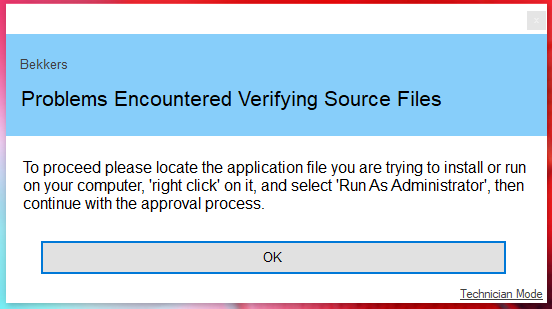
Why am I seeing "Problems Encountered Verifying Source Files"?

Written by Daniel Rivera

Updated at July 8th, 2025

Contact Us

If you still have questions or prefer to get help directly from an agent, please submit a request.
We’ll get back to you as soon as possible.

  • AutoElevate Knowledgebase
    New to AutoElevate? START HERE General & Troubleshooting Managing Rules Integrations Announcements FAQ Sales & Marketing
  • Password Boss Knowledgebase
    Using Password Boss Business Administration Password Boss Partner Documents
  • CyberFOX DNS Filtering
    Getting Started Filtering Policies Company and Location Setup Roaming Clients Reporting and Logging Troubleshooting
  • Marketing Toolkit
    MSP Marketing & Education Toolkit
  • Changelogs for Autoelevate and Password Boss
  • CyberFOX Product Roadmap
  • Current Status
+ More

Table of Contents

Key Note


This message serves as additional guidance to assist you. It advises you to right-click on the installer and select "Run As Admin." In some cases, installers may extract another executable file into the "AppData/Local/Temp" folder and execute it from there. These files often lack metadata, making them challenging to identify. Furthermore, the "AppData/Local/Temp" directory is a common location for malware execution. As a precautionary measure, when we detect a file running from this directory, we prompt the end-user to right-click on the original file for proper identification.

By default, this was our standard approach for handling files from "AppData/Local/Temp." However, you have the option to customize this behavior by disabling the "Agent Security - Block Requests from 'AppData\Local\Temp'" setting on your Settings screen.

If you choose to disable this setting (and allow approximately 10 minutes for the configuration to propagate to the local agent), the installation process for the application should proceed without interruption.


Key Note

Only Administrators can access this global setting.


source files verifying issue

Was this article helpful?

Yes
No
Give feedback about this article

Related Articles

  • How does AutoElevate work?
  • For "User" elevation why do I keep getting "Incorrect Password"?
  • Why didn't my approval prompt a notification to the user?
  • I am logged in as an Admin. Why am I still being prompted by AutoElevate?
Request a Demo
  • Get Pricing
  • Start Trial
  • Contact
  • Support Center
  • Login
Solutions
AutoElevate
  • AutoElevate Overview
  • Remove Admin Privilege
  • Just-in-Time Admin
  • Blocker
Password Manager
  • Password Manager Overview
  • Features
DNS Filtering
  • DNS Filtering Overview
MSPs
IT Departments
  • Overview
  • State and Local Government
  • K-12 Education
  • Manufacturing
  • Higher Education
Resources
  • Resource Center
  • Group Demos
  • Events
  • The Simple 7™
Company
  • About
  • Leadership
  • Culture & Values
  • News & Press
  • Awards
  • Partnerships
  • Referral Program
  • Trust Center
CyberFox Logo

CALL US (813) 578-8200

© 2025 CYBERFOX LLC ALL RIGHTS RESERVED | Privacy Policy | Terms of Service | Sitemap


Knowledge Base Software powered by Helpjuice

Expand